
Our IWS Products in Focus
Optimize your IZWS environment with our powerful analysis tools:
IWS/Graph, IWS/Audit, IWS/BatchAD, and IWS/BatchCP. These solutions provide comprehensive capabilities for visualizing, managing, and automating your IWS processes, ensuring maximum control and efficiency in your IT environment.

Our IZWS Products at a Glance
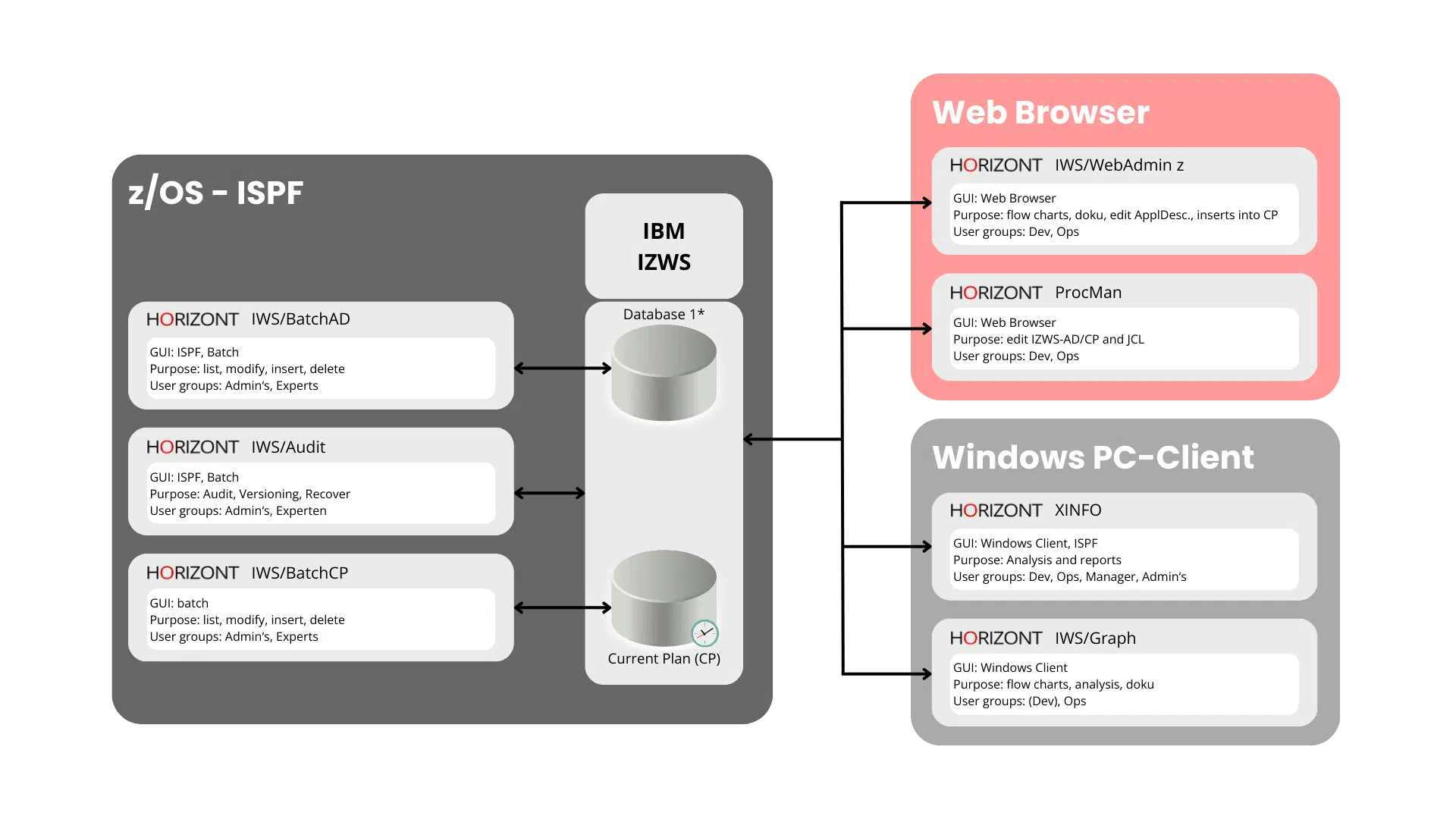
IWS/Graph – Visualization and Monitoring for Your IZWS Environment
Benefits and Features
Visualization and Documentation
Create graphical representations of your job networks, bar charts for runtimes, and clear documentation of your IZWS jobs. Gain straightforward insights into your production processes.
Forecast and Monitoring
Use forecasting capabilities to identify potential bottlenecks early and monitor the status of your batch production in real time. IWS/Graph gives you end-to-end control over your workload automation.
Online and Offline Operation
Work flexibly: whether online with direct access to live data or offline with local copies for independent analysis, IWS/Graph adapts to your needs.
Extended Data Access
Access detailed information on jobs, dependencies, JCL, and resources. With IWS/Graph, you streamline communication between production planning, business departments, and application development.
Further Informations
Use Cases
Production planning and control:
Simplify the management and optimization of your batch processes.
Application development and business departments:
Benefit from clear visualizations to better understand and streamline workflows.
Project and test teams:
Use the intuitive interface to plan and execute tests and projects seamlessly.
Audit and compliance requirements:
Document changes and processes transparently for audits and reporting.
Everything You Need for Your IZWS Environment
With IWS/Graph, you simplify communication between teams, optimize your production planning, and build a foundation for informed decision-making. Rely on a tool that doesn’t just visualize your IZWS processes, it measurably improves them.
Downloads
Presentations, flyers, training materials, whitepapers, etc. (no password required):
Click here!
For installation files, hotfixes, or documentation, please use the following links:
Installation files | Hotfixes | Documentation | Customer Portal | Support Portal
Graphical. Intuitive.
Versatile.
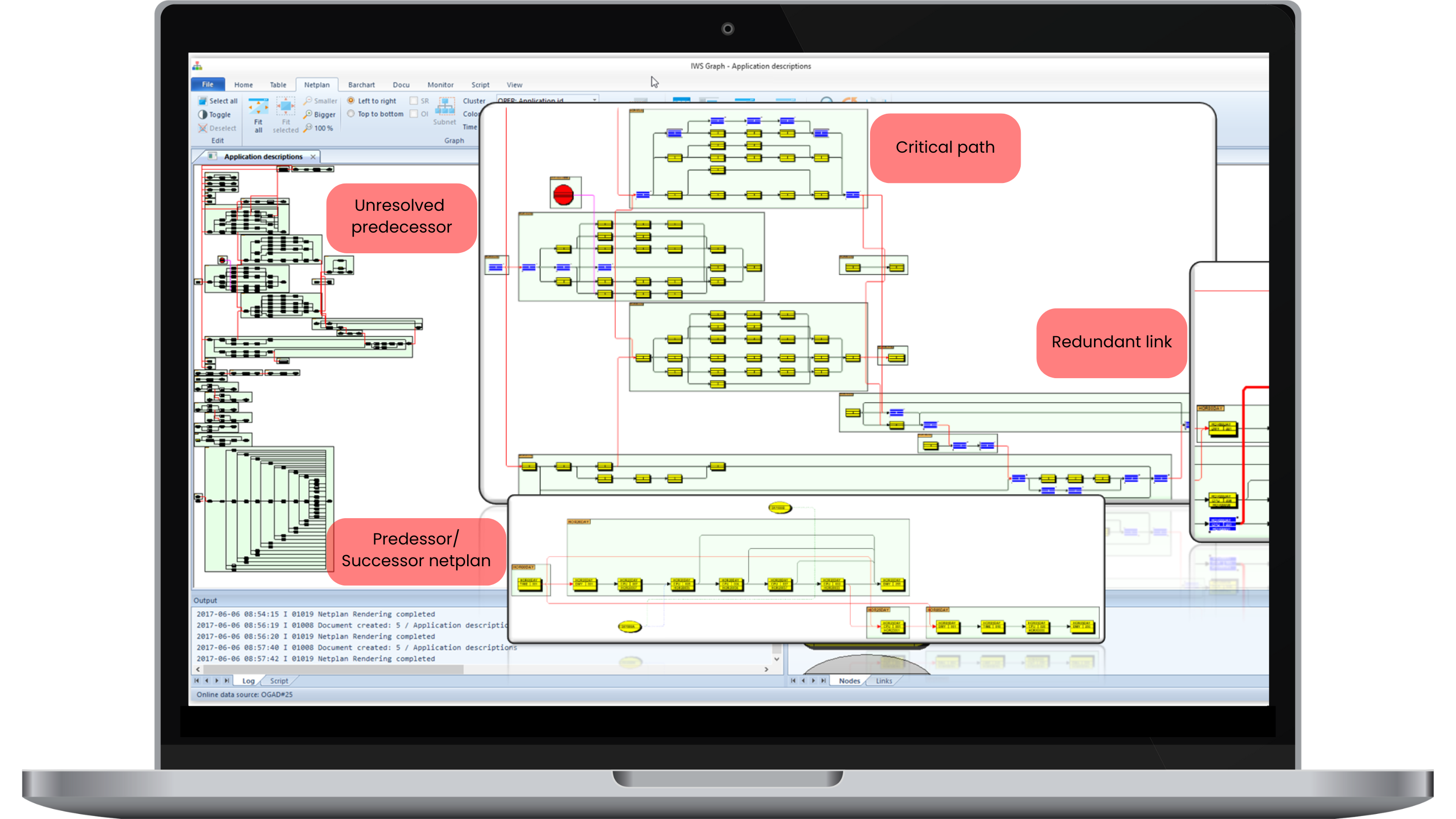
IWS/Audit – Transparency and Security for Your IZWS Environment
Benefits and Features
Audit-Proof Logging and Archiving
IWS/Audit automatically documents all changes to your IZWS objects and stores them in a secure database. You maintain full visibility over modifications at all times and meet the highest compliance requirements.
Efficient Search and Filter Functions
Find the information you need quickly. With extensive search criteria and a user-friendly ISPF dialog, you can precisely analyze and display changes and versions.
Comprehensive Version Control
Compare different versions of your IZWS objects or restore previous versions when needed. With generated batch loader instructions, changes can be easily rolled back.
Troubleshooting and Transparency
IWS/Audit helps you quickly identify and resolve error sources. Through complete traceability, you create a solid foundation for transparent and optimized production processes.
Further Informations
Use Cases
IWS/Audit Audit is the ideal solution for teams that require detailed tracking and audit-proof documentation:
- Production planning:
Full transparency over all changes in the production environment. - Production operations:
Fast error analysis and resolution. - Auditing:
Meeting compliance requirements with detailed audit reports.
Everything You Need for Your IZWS Environment
Discover how IWS/Audit makes your production processes more secure and efficient. Download our flyer or contact us to learn more.
Downloads
Presentations, flyers, training materials, whitepapers, etc. (no password required):
Click here!
For installation files, hotfixes, or documentation, please use the following links:
Installation files | Hotfixes | Documentation | Customer Portal | Support Portal
Transparent. Secure.
Efficient.
IWS/WebAdmin z/OS – Your Modern Interface for IZWS
Benefits and Features
Web-Based User Interface
Replace the ISPF dialog with an intuitive web application and easily access multiple subsystems simultaneously.
Graphical Visualization
Visualize processes as network diagrams and bar charts to clearly present dependencies and workflows, ideal for everyone from administrators to business departments.
Advanced Analysis and Simulations
Use forecasts, what-if scenarios, and critical path calculations to optimize your planning and make well-informed decisions.
Comprehensive Reporting
Generate detailed reports and queries from your IZWS environment without putting load on the subsystems, thanks to the integrated PostgreSQL database.
Further Informations
Use Cases
IWS/WebAdmin is versatile and supports different teams in managing and optimizing workload automation processes.
- Production planning and operations:
Simplify the monitoring and management of complex workflows with a modern, intuitive interface. - Application development:
Create, edit, and analyze AD and CP data efficiently, for error-free and seamless production transitions. - Project and test teams:
Plan and test changes or new definitions independently from the live system and ensure optimal integration. - Business departments:
Benefit from clear visualizations and reports that are easy to understand, even without in-depth IT knowledge.
The Solution for Your Workload Automation
With IWS/WebAdmin, you increase efficiency, transparency, and usability across your IT environment. From clear visualizations to comprehensive reporting, this tool provides everything you need for optimized IZWS management.
Downloads
Presentations, flyers, training materials, whitepapers, etc. (no password required):
Click here!
For installation files, hotfixes, or documentation, please use the following links:
Installation files | Hotfixes | Documentation | Customer Portal | Support Portal
Intuitive. Clear.
Efficient.
IWS/BatchAD – The Bulk Change Tool for Your IZWS
Benefits and Features
Efficient Bulk Changes
Make changes to jobs, operations, resources, and more in just a few steps. IWS/BatchAD reduces the effort for repetitive tasks and minimizes the risk of errors.
Ease of Use
No programming knowledge required: IWS/BatchAD uses easy-to-understand control statements that can be operated without in-depth IT expertise. A test mode provides additional safety before going live.
Flexible Data Transfer
Transfer objects such as job networks, variables, or calendars between test and production environments and automatically adjust them as needed, for a seamless workflow.
VVersatile Additional Features
Use sorting and export functions to organize definitions efficiently. Handle complex changes to dependencies, resources, and job parameters with ease and precision.
Further Informations
Use Cases
IWS/BatchAD is the optimal solution for anyone looking to perform complex bulk changes efficiently and accurately. From production planning to test and business departments, the tool supports different teams in streamlining workload automation processes and responding flexibly to change.
- Production planning and operations:
Simplify the management and optimization of your workload automation. - Project and test teams:
Accelerate the rollout of new definitions into your production environment. - Business departments:
Benefit from clear and straightforward customization options to efficiently implement operational requirements.
Everything You Need for Precise Bulk Changes
IWS/BatchAD is the perfect complement to IZWS for simplifying your automation processes and minimizing error sources. Rely on a tool that saves you time and optimizes your IT processes.
Downloads
Presentations, flyers, training materials, whitepapers, etc. (no password required):
Click here!
For installation files, hotfixes, or documentation, please use the following links:
Installation files | Hotfixes | Documentation | Customer Portal | Support Portal
Precise. Simple.
Efficient.
IWS/BatchCP – The Automation Solution for Your Production Planning
Benefits and Features
Comprehensive Change Options
Objects such as jobs, operations, dependencies, and resources can be easily listed, modified, inserted, or deleted, without any programming knowledge.
Flexible Integration and Planning
Use IWS/BatchCP within REXX or CLIST functions, or schedule recurring changes automatically. The tool’s flexibility adapts seamlessly to your requirements.
Automated Production Control
IWS/BatchCP replaces manual input with automated changes to current plans and long-term plans. Save time and increase the efficiency of your operations.
Further Information
Use Cases
IWS/BatchCP supports a wide range of teams and applications, including:
- Production planning and operations:
Automate recurring tasks and minimize manual errors. - Business departments:
Gain quick access to important information from day- and long-term plans. - Automation:
Leverage flexible integration to optimize workflows and accelerate processes. - Project and test teams:
Simulate jobs and dependencies to ensure smooth test and production transitions.
Take Your Production Planning to the Next Level
Discover how IWS/BatchCP optimizes your production processes through automation and precise control. Achieve transparency, efficiency, and security, all in one powerful tool.
Downloads
Presentations, flyers, training materials, whitepapers, etc. (no password required):
Click here!
installation files, hotfixes, or documentation, please use the following links:
Installation files | Hotfixes | Documentation | Customer Portal | Support Portal
Precise. Flexible.
Automated.

Looking for a quote or a trial license?
Simply reach out to us via our contact form – we look forward to hearing from you!